Archive for the 'Tech' Category

277 Days

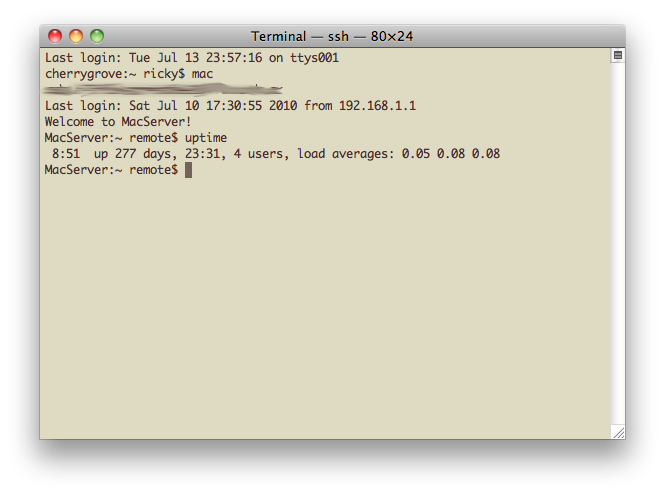
After 277 days of flawless power, there was an interruption of service at my house. For 75.9% of a year, my little PowerMac G4 Cube dutifully served files and routed traffic. This post is in memory of its record uptime, cut short by a lack of electricity.
“Don’t be evil”

An absolute must-read blog post from Google today. Go read it now.

…We have decided we are no longer willing to continue censoring our results on Google.cn, and so over the next few weeks we will be discussing with the Chinese government the basis on which we could operate an unfiltered search engine within the law, if at all. We recognize that this may well mean having to shut down Google.cn, and potentially our offices in China…

Google has been struggling to win the hearts and minds of Americans as it continues to churn out more products and services with hopes of organizing the world’s information. Noting its massive efforts, privacy advocates and technologists have warned of the emergence of an evil empire. I believe these concerns are valid to a point, and therefore, today’s blog post and change of policy are huge news.

I don’t want to give anyone or any company a free pass. Although I’m thankful for Google’s services, and honestly owe much of my success in life to them, their policy of censorship in China gave me pause. Today’s announcements, although troubling in some aspects, give me some hope.

Just figured you should know.

Gmail Gfail

Gmail Gfail

Gmail Gfail

Remember my ecstatic post three days ago about ridding myself of the wretched Invite a Friend box from Gmail? Well, it’s back.

I’m going to have to investigate this further. I don’t want to use a browser extension to hide it. However, if that’s my only option, I may cave.

Removing the “Invite a Friend” Box from Gmail

I’m a control freak when it comes to my critical information systems, especially when it comes to managing my email. For years now, I’ve been staring at my “Invite a Friend” Box in my gmail account, and for years, I’ve had no need to invite anyone. I’ve googled for hacks or Google Labs features to remove the box, but never found an acceptable solution.

Then it hit me. If I use up the invites, the box should go away. If it doesn’t have a purpose, a reason to exist, the server gods at Google will surely remove it from my Gmail web interface, right?

Fortunately for me, yes! And all I had to do to claim those pixels was to send 99 gmail invites to myself. Piece of cake.

Google Wave

Holy crap.

That’s just about all I can say after watching the demo of Google’s new product, Wave. Wave is a lot of things. It’s a new metaphor for communication that goes beyond email, instant message, wiki, and docs. It’s a service that Google plans to release in the future. It’s an open platform for organization-to-organization communication.

If you have a little over an hour, watch the demo video. Over a million other people have, so you’re in good company.

My prediction is that Wave is going to make a big splash. I can’t wait to use it.

Google Reader

Are we friends on Google Reader? If not, we should be.

Google Reader allows you to share stories you find particularly interesting with a list of friends. It’s incredibly powerful for establishing your own news filter – something I’ve been very interested in over the past few months.

Go to “Sharing settings…” in the Reader interface and in the text box on the bottom right part of the page enter my gmail address (rice28m). Be sure to leave a comment on this post and I’ll start sharing with you, too.