Search Results for 'feed'

How I’m Doing at the End of 2025

I am in the process of updating my résumé. Not because I’m looking for a job[1], but because I like to feature my résumé on my website and the current published copy doesn’t reflect my pivot from engineering management to an individual contributor role two years ago. I feel a little bit weird about the misrepresentation, and would rather update the document than take it down. While working on some edits, I was reflecting on how things have been going, and decided to write this “what’s been happening” post as my productive procrastination.

Caretaking

Two years ago, I wrote:

I’m living with my mom in upstate New York, somewhere between Poughkeepsie, NY and Danbury, CT. My mom has several health conditions, including chronic pain and memory impairment, that my sister and I have been helping her manage.

All of this is still the case, but it’s gotten progressively more difficult. Summoning the patience and grace, every day, to show up for someone else who is almost always in pain and is regularly in need of help navigating tasks involving any kind of bureaucracy — it’s hard. To tell you the truth, it’s been really hard. And before you ask, in my experience, it’s harder to find in-home help that actually helps than to shoulder this myself, if that makes sense. Especially in a rural area.

I don’t have much of a community or much in terms of friends where I live. In-person dating also isn’t viable here. I haven’t moved me and my mom closer to friends I have down in the city because her home is familiar to her and she says she’s comfortable here and doesn’t want to move. This is negotiable, but the thought of project managing a move is just too much for me to handle given my regular responsibilities. There’s also no other family besides me and my sister.

The way that I relieve the stress from my caretaking role is to travel to see friends domestically and visit new places internationally as often as I reasonably can. When I travel, my sister, who lives about a half hour away, steps in to take care of things with my mom. That’s hard on her, because as I know full well from doing it for a decade, caretaking is harder without having passive eyes and ears on the person being helped; phone calls and visits reveal less of the ground truth.

But my travels are fun! And travel is especially nice because I no longer use nearly all of my vacation time visiting home, and because I’m lucky enough to travel for work sometimes. This last year I was able to visit Australia, New Zealand, Türkiye, Japan, the SF Bay Area, Seattle, Denver, and Boston.

Putting this together, it feels like I’m living my life in a cycle. I spend a few weeks or months in upstate New York keeping everything on the rails at home while working my sometimes also stressful full-time software engineering job; and then I go somewhere else and feel like a young, vibrant person at the top of my game — funnier, hotter, and smarter than I’ve ever been at any other point in my life; until the point where isolating upstate for a couple of weeks sounds kind of nice.

The balance is very far from perfect, and I know I’ve made it sound difficult in this post, but I am profoundly grateful and happy that I’m able to be here for my mom. She doesn’t deserve her chronic illness. (In fact, nobody deserves chronic illness, and seeing the way that society treats the chronically ill first-hand has been one of the most impactful experiences in my life). She’s a sweetheart, I love her dearly, and being able to be here is meaningful to me. It’s just hard.

Oh, and don’t worry — I have a therapist, and they’re great. :)

Zepbound

I started taking Zepbound earlier this year, and it’s been one of the best things to happen to me in my entire life. With the help of this medication, the constant preoccupation with food I’ve felt my entire life is under control. If you’ve known me for a while, you’ve seen my body change in shape over time as I’ve oscillated between my “regular” state and a way of living where I was managing the stress-eating that I’m prone to at the cost of a wild amount of willpower — almost a singular focus of my being alive. This medication is helping me with my relationship with food more than anything else I’ve tried and I tolerate it extremely well.

Despite all of the bullshit shame that society wants us to feel around needing help with food, I am so happy to talk about this. My primary reason for starting the medication was to address some early signs of potential health issues my doctor and I could see on the horizon. My goal wasn’t and isn’t a target weight or appearance. Instead, it’s to consistently measure some better health markers. I’m happy to say that I’ve started hitting some of those goals!

My employer is paying for most of this very expensive medication, and I’m really happy about that. Early this year I was ready to start paying for it out of pocket ($1000+ a month, ~$500 with coupons), but I figured I’d check with my insurance one last time before ponying up, and it turns out, in 2025, my employer started offering a relevant benefit to employees. After going through a 90 day online course that coaches you through healthy eating, sustainable exercise, and habit building, you’re a candidate for medication like Zepbound.

I was legitimately devastated to have to wait another 90 days to try out this new-to-me form of help after a lifetime of being coached on healthy eating, sustainable exercise, and habit building. And the gatekeeping of it all is legitimately offensive to me. But no matter how devastated or offended I felt, I figured it’d be worth going through the program if I could potentially save hundreds of dollars a month on a medication that, other than the cost, I have no reservations about being on for the rest of my life. With my insurance, I pay roughly $25 a month.

(An aside: If you would benefit from getting help in this area of life, and your health insurance is provided by your employer, and you aren’t your own employer, and your insurance doesn’t cover it, keep checking to see if coverage has changed. I also recommend sending a quarterly letter to your employer’s benefits department making a case for coverage. I also wouldn’t blame anyone for leaving a job ever, but especially for leaving to get coverage on a life-changing medication. And if you work where I work, hit me up if you have questions or want details about the program.)

Career

The last two years have been good for correcting something important: making the work I do in the tech industry matter less to me, compared to other aspects of my life, than it used to. Living with and helping to take care of my mom has helped foster a sense of perspective I was struggling to grow by myself in California[2].

And yet, and I think this is a good thing overall, my work in tech still matters to me and motivates me. I surprised myself earlier this year when I finally accepted a standing invitation to speak at the FIDO Alliance’s “Authenticate” conference and started the difficult work of putting together a story, finding my emotional center around that story, and iterating on how I told that story with the help of my colleagues until it was a story I was excited to tell.

Said more directly, putting a good conference talk together is a shit-ton of work. I was asking myself, “Who is this Ricky? Am I happy that they’re back?” And during the more busy moments with the rest of my day job and the tougher moments of taking care of my mom, I was very seriously cursing myself. A feeling I find to be unpleasant, but also useful and validating, is when I have enough presence of mind to recognize that I’ve stretched myself too thin, and that some part of my life is merely getting the best I can give it right now and not what I wish I could give it right now. (What’s much worse than this feeling is to lose myself enough that I don’t even realize I’m letting people down!)

Fortunately, even I have convinced myself that the talk was good and worth doing. An ongoing project for me right now is iterating on the value proposition of passkeys by collecting and distilling feedback, advocating for changes internally where I work, and talking to my industry colleagues inside and outside of standards to address problems. This is challenging because although I deeply believe in passkeys, I cannot immediately effect change on the many websites, apps, and other passkey managers that make up the overall global experience of and sentiment around them. Despite any and all criticisms people have about passkeys, I am stunned by how well the industry transition away from passwords and to passkeys is going. The momentum is wildly outpacing my expectations.

Outside of passkeys, in 2025, I was really proud of the work my team did to polish the Passwords app after its 1.0, and I figured out how to bring two features to the world that I love because they’ll save people time and maybe make them smile. The first was to offer AutoFill of security codes contained in the contents of app push notifications, including apps like Gmail and WhatsApp, in iOS 26. The second was to offer AutoFill of security codes in all apps on macOS 26, including web browsers. The engineering on this last one was wild, and it wasn’t without complications at launch, but we got ‘em cleaned up, and now more people than ever can use their brains to do things other than manually type six digit codes.

:)

If you read this far, it probably means that you have supported or are supporting me in some way in my life, and I appreciate that! If we’re friend friends and we haven’t chatted in a while, reach out! And if we’re not, please do take me up on meeting up when I toot or skeet that I’m visiting near where you live. Please be kind to yourself, happy holidays, and happy new year!


  1. I’m not looking for a job! I’m happy with my role where I work right now. That said, everyone has a specific combination of both a price and a conscience. My hands aren’t perfectly clean, but I can live with a software job that resolves around saving people time, frustration, and some of the pain of having their online accounts compromised.  ↩

  2. This had a lot to do with the fact that the sole reason I was living in the bay area was for my career.  ↩
Magic Links Have Rough Edges, but Passkeys Can Smooth Them Over

Important Note: On this blog I speak only for myself as someone experienced in usable security and website authentication. I am not speaking for the company I work for. I encourage linking to and talking about this post, but if you can, please identify me without affiliation.[1]

Independent media venture 404 Media recently published a post titled, “We Don’t Want Your Password”. The piece is a cogent explanation of the problems with password-based accounts online followed by a defense of the website’s login strategy, magic links, in the face of feedback about them being inconvenient and difficult to use.

I applaud 404 Media for having the courage to do what they feel is best for them and their customers, even if their customers may not expect it, and I give them a standing ovation for remaining resolute, but thoughtful, in the face of complaints. Passwords are deeply entrenched, and straying from the expected or default path for any kind of service, much less a media venture, is taking a risk. I’ve been meaning to write about my frustrations with and appreciation for magic links for some time now, and the steadfastness and clarity of this post pushed me over the edge to do it.

Obviously, authenticating to websites isn’t an either-or binary between passwords and magic links. Passkeys — the next-generation authentication standard defined by the FIDO Alliance and W3C, with backing from all of the major platforms, browsers, and credential managers — can be layered nicely into a magic link-based system to give users a secure and fast sign-in experience without the frustrations that come with switching apps to refresh one’s email. They’re complementary technologies, because passkeys can do this in a way that seamlessly coexists with, and is in fact supported by, email magic links for people who don’t yet have a passkey, don’t want a passkey, don’t have the device stability to use passkeys, or would prefer to sign in with a magic link this one time.

You’ve almost certainly encountered magic links in your time online. A “magic link” is just the special, one-time link you get emailed to you that will sign you into a website after giving it your email address. And if you’re reading this post, there’s a good chance that you use a password manager and that you find magic links to be far slower than using your password manager to sign into a website.


They frustrate me, too. My local grocery store, one of the many Albertsons companies, has taken to preferring an email magic link over my easily-AutoFilled password, and it frustrates me every single time I try to sign in. Once you’ve experienced a world where signing in to websites and apps is so seamless it requires next to no thought, while still being secure, you never want to go back.

But I also kind of love magic links, because they acknowledge — no, radically accept — some fundamental truths. Namely, that…

  1. almost all online accounts can eventually be signed into by proving possession of an email address; this is usually phrased as “forgot password?”
  2. many of the people who don’t use password managers use that “forgot password?” flow every time they sign in because people cannot use passwords effectively; why shouldn’t they just make that the user experience for everyone, or at least, the default flow?
  3. merely having a password for a service opens a user to attacks like credential stuffing, which is when stolen account credentials are used to gain access to accounts on other systems; credential stuffing is particularly effective because people reuse passwords

The title of 404 Media’s piece very powerfully acknowledges point 3 by saying, “We Don’t Want Your Password”, singular, acknowledging that most people have on average approximately 0.8 correct passwords in their memory at a time. And they’re willing to cop to the negative feedback they’ve gotten, writing:

Probably the most common problem people run into with magic links is they think they have logged into the site on their normal browser, but they’re actually logged in through an in-app browser. For example, someone might receive the login link to their email. They open up the Gmail app, click the “Sign in to 404 Media” button, and their phone loads the webpage. But this is loading the website in Gmail’s web browser, not your native Safari one.

In-app web browsers are unlikely to go anywhere any time soon[2], so the post describes how to work around the problem:

A solution on iPhone is when receiving the login link, click and hold the “Sign in to 404 Media” button to bring up the contextual venue, and hit “Open Link.” This will open the link, and sign you in, on your native browser. Or, copy and paste the sign in link which is also in the email.

Them calling this out is a tell; we can infer that these complaints are a real problem for 404 Media because they saw value in addressing a very specific user experience complaint. The way that their business works is that people directly pay to read their journalism; anything that stands in the way of people getting their money’s worth can impact their bottom line. I can’t say that my local grocery store’s strong preference for magic links has stopped me from being a customer, but that’s likely because I live in an area where they have an effective monopoly.

Something that I’ve learned by working on the user experience around website and app authentication is that, if you need to educate a person to go against what the inline flow naturally leads them to do, that cognitive friction will frustrate or stymie a significant number of people.[3]

Despite these drawbacks, I think that proving possession of an email address as a mechanism for signing into an online account is valuable and has its place for many, but not all, websites and apps, because email is decentralized and universal, email account providers are very highly incentivized entities to protect user accounts (e.g. Apple, Google, or Microsoft aggressively drive email account security forward), and ultimately, most people can follow instructions to check their email. This is of a kind with my belief that although it is far from ideal, SMS 2FA has its place, because authentication technology is all about threat modeling and what actually works in practice.

Passkeys

I’m going to assume that you know what passkeys are and that you’ve used them with your Google, PayPal, or TikTok account, or some other online account. If you need a refresher, I’ll plug my four minute video explanation of passkeys from a few years back that holds up pretty well today.

For the purpose of improving a passwordless authentication strategy using magic links, what’s important to remember is that passkeys suffer from none of the security problems that passwords have, and that signing in with passkeys is super fast, keeps users in their context, and never requires switching over to another app.

When it comes to speed and ease of use, in an April 2024 update on their passkey rollout, Google claimed that passkeys are 50% faster than passwords. And in my personal experience, signing in with passkey can sometimes be an order of magnitude faster than signing in with a magic link.

On iOS and Android, in notable contrast to magic links, passkeys are directly usable across web browser apps and system web view experiences. (Really. Any passkey saved and usable in Safari, whether in Apple Passwords or an app like 1Password, is usable in Chrome for iOS, Firefox for iOS, Gmail for iOS, and more.) So if a user follows a link to 404 Media in any web browser or in any email or social media app that makes use of the system web view, they can use their passkey to sign in within seconds. This is even true in web browsers like Chrome and Firefox on macOS!

For a user to sign in with a magic link, they first need to type or AutoFill their email address into a text field on a website.

Here’s the magic: Passkeys can seamlessly integrate into AutoFill.[4] Instead of filling the literal email address, AutoFill can sign the user in with one tap and a Face ID, while behind the scenes performing the strong authentication that powers passkeys. Here’s a six-second video showing me using AutoFill and a passkey to sign into my Google account in Safari on my iPhone:

Video showing opening the Google sign-in page loading in Safari. The page has a single “Email or phone” field. Near-instantly after the page loads, an AutoFill affordance appears, saying, “Sign in to google.com with your passkey for “email@example.com”?”. It features a big blue button that reads, “Use Passkey”, and tapping it performs a Face ID that signs me in.

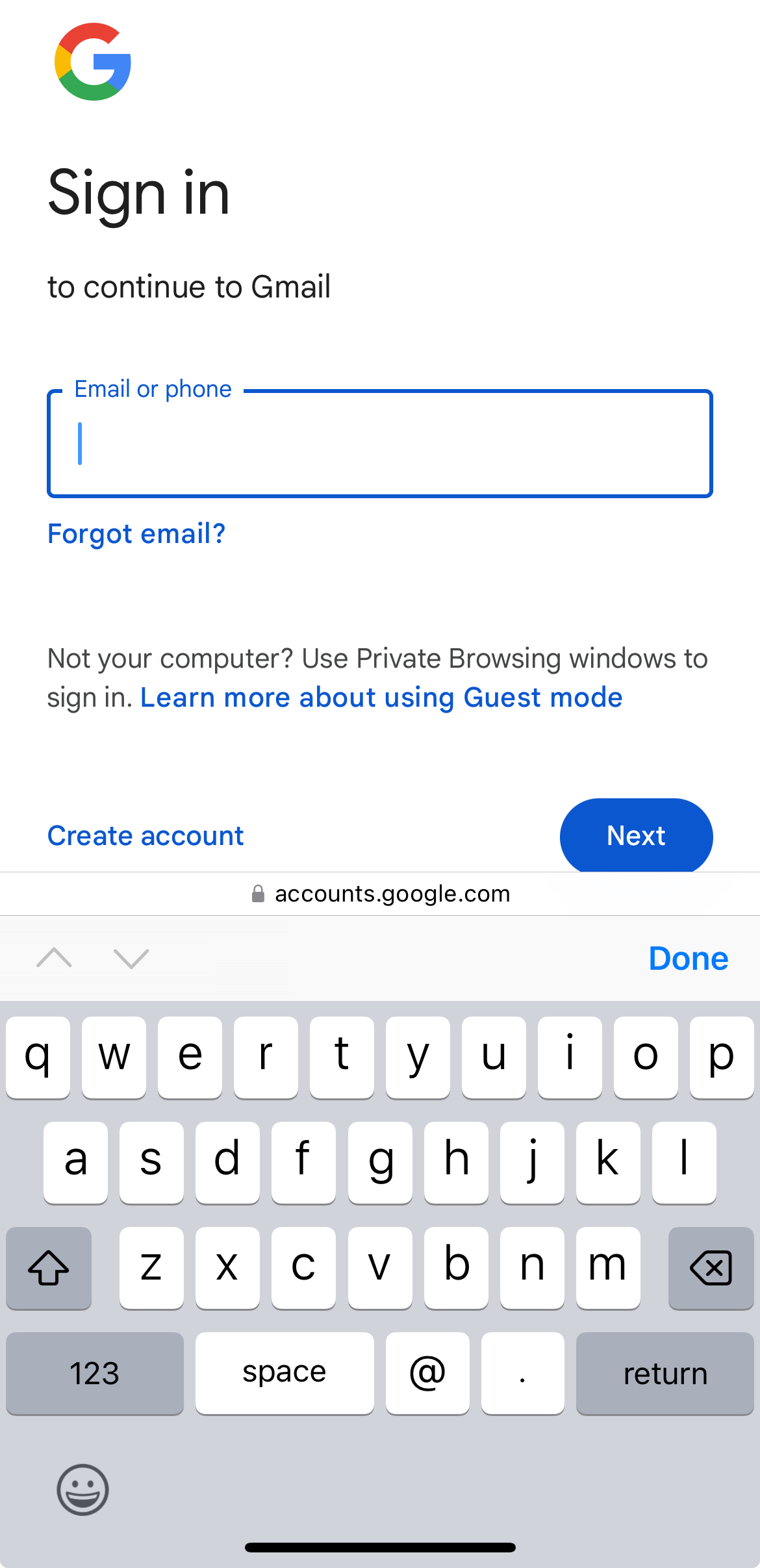
The most important part of this experience is that it causes zero disruptions for people who don’t already have a passkey. Here’s what’s visible in Safari on my iPhone when I don’t have a saved passkey:

Screenshot of the Google sign-in page in Safari. The page has a single “Email or phone” field. The standard text insertion keyboard is present.

You’ll notice that this looks like a totally pedestrian web form asking the user to enter their email address. The Google website has still asked the browser to help it sign in using a passkey, but since I don’t have one, I’m left to type my email address.

The website of my grocery store, as well as 404 Media’s website, could work exactly the same way, with a field for the user’s email address that is progressively enhanced to have passkey sign-in when it’s available. And all of this works without a password. (For a resource on how to implement something like this, see the footnote attached to this sentence.[5])

To start, websites using magic links can make passkeys an optional, opt-in feature for the customers who have complained about how their magic links work today. To ensure it doesn’t cause any problems, as a sort of soft launch, they could make the feature 100% opt-in.

Slightly later on, once the people running the website are convinced that passkeys really help with the user experience issues around magic links, they can prompt users to add passkeys after signing in, once every 90 days or so, or whenever they sign-in using the cross-device sign-in feature of passkeys[6]. The framing of such a prompt can be something like this for users on Apple devices: Want to avoid having to check your email next time? Set up a passkey to use Face ID or Touch ID to sign in quickly and securely.

The Role of Software Platforms

The user experience and security of what I’ve demonstrated are a clear improvement over either password-based sign-in or a magic links-only experience, but in the world of running a business, nothing is free. In fact, doing literally anything at any kind of scale takes a lot more work than any of us like to think, especially for folks who have gone independent. A corporation like Albertsons may be able to afford to build and deploy passkey support, but developing and deploying a one-off feature like passkey support in 404 Media’s content management system almost certainly will not be worth the cost to them as a small business in the struggling field of online journalism.

And yet, I still wrote this post! Why is that? :)

Like a large portion of the web, 404 Media is using an open software platform (in this case, Ghost) to power their venture. If the world can convince Ghost and other platforms like WordPress and Mastodon to support passkeys, and maybe even contribute time, money, or expertise to make it happen, a huge number of people stand to benefit.

Resources

If you’re in a position to implement passkeys or influence an organization to implement them, I think it’s time to evaluate, engage with, and implement passkeys. Here are some resources I recommend you check out:

I’m also personally happy to answer questions and talk with folks considering adopting passkeys. I’m serious — hit me up.

Takeaways

I want to see my friends, family, and people who I will never meet no longer harmed by passwords, and I have dedicated the last five years of my career to dethroning them as the default credential for websites and apps. Passkeys aren’t perfect, because nothing is, but myself and other members of the FIDO Alliance are always listening to feedback and working to improve them. And as they exist today, they can clearly make the experience of signing into websites faster and easier than before.

Again, if you have questions about passkeys or authentication technologies in general, feel free to hit me up on Mastodon or Bluesky. I hope you learned something, and thanks for reading!


  1. As you can tell, I am taking great pains to not have my blog meaningfully affiliated with my employer. I am doing this to respect my employer’s desire to not have employees interpreted as speaking for the company when they are speaking only for themselves. As a proud member of technology standards organizations with noble goals, and as an independent person, I hope I can help the industry by contributing my perspective from time to time. If being pressured to not emphasize my employer in a link post dissuades you from linking to it, then I didn’t deserve your link in the first place. :)  ↩

  2. The incentives, economics, and privacy considerations around in-app web browsers is a fascinating and important story, but one I am not able to tell.  ↩

  3. If you’ll give me some leeway, I think it’s analogous to password management software in that password management software has a ceiling to the number of people it can help, because fundamentally, it is laying instructions and a process on top of websites and apps that expect people to create and type passwords by hand. The dissonance that I’m describing here is similar to the difficult to remember to do advice to copy and paste a sign-in link that is screaming to be tapped. This advice is almost begging you to inhabit the mental model of how browser cookies work, which is something that normal people shouldn’t have to do.

    This ceiling for the number of people password management software can help is part of why I believe so strongly in passkeys. A single, attractive affordance for signing in can confuse fewer people than whatever a password manager lays on top of a web page.  ↩

  4. In WebAuthn parlance, the use of passkeys with the AutoFill user experience is called “conditional mediation”. It’s not just a powerful tool for integrating with magic links, but also with existing password-based sign-in experiences.  ↩

  5. WebAuthn Conditional UI (Passkeys Autofill) Technical Explanation, a post from the Cordabo blog, goes into detail on how to implement conditional mediation for passkeys.  ↩

  6. As demonstrated in the four minute video I linked to, passkeys can be used to sign in across devices. So I can use a passkey on my iPhone to sign into a website on a Windows PC. Websites can detect when this happens, and should turn around and ask the user to register another passkey on the “new” device.  ↩

XOXO

I’ve never attended a conference before in a personal capacity[1]. Sure, I’ve worked events my employer has put on and spoken at conferences about what I do professionally, but I’d never paid money to show up somewhere just to learn, get inspired, or hang out. That changed a few weeks ago, when I visited Portland, OR to attend the final XOXO Festival.

I genuinely had one of the best times of my life at XOXO. From the first lovely moment until the very last, I was smiling like a goofball. The kind of happy where you spontaneously wiggle or catch yourself skipping a little bit. (I have to assume that other people skip involuntarily when they’re happy. Let me know.)

Why did I have such a great time?

  • Andy Baio and Andy McMillan, the founders, created an event where it was possible to fully participate while having a chance of avoiding contracting COVID–19. The festival had a firm policy around masking indoors and handed out masks to folks who needed them. More importantly, it was possible and convenient to participate outdoors, with a dedicated outdoor area for viewing talks and having conversations. That safety allowed me to actually enjoy myself, rather than feel like I was fighting another skirmish in my war against getting sick with COVID–19.
  • I ran into and got to catch up with internet friends who I had no idea were going, who I hadn’t seen in person since before the start of the pandemic. It was so nice to see them!
  • I got to introduce myself to people who I admire and tell them exactly what their work has meant to me, which I something that I love doing. And some people were kind enough to introduce themselves to me and tell me what my work has meant to them, which catches me off guard every time it happens.
  • The event self-selected for warmth and kindness. If you and another person started chatting, you were pretty much guaranteed to have a pleasant and meaningful conversation.
  • The event also self-selected for people who were comfortable and sometimes eager to talk about burnout, which is something that I’ve slowly been healing from by blowing up my life. I found it really helpful to talk about my feelings around burnout.
  • There was a gentleness to everyone who was there. It felt like we were all doing the work to heal after the collective traumas of the last few years. I had some particularly nice downtime sitting alone, but together, with someone who I had just met.
  • Strangers paid me compliments about choices that I had intentionally made about my appearance in a way that was welcome and not creepy. This by itself was delightful, but it again reflects on the thoughtfulness of the community.

I want to thank the Andys, everyone who sponsored and volunteered to work the event, and all of the attendees for making it such a great time. In a world where many of us are more isolated than ever, I think it’s critically important to connect with people in the way that XOXO facilitated.

If you’ll let me get a little woo-woo for a second: Why are we alive if not to connect with other people? Our consciousness is so precious. It’s mind-blowing that any one of us exists and knows that we exist — let alone that we can share feelings, spaces, and thoughts with each other. To wrap oneself in the blanket of a community where that happens is so beautiful to be almost sacrosanct.

See y’all online,
<3


  1. Okay, fine. I attended a single conference before this one: jQuery Conference 2010: Boston on a student scholarship. Three things about that conference:

    1. My bicycle was stolen the first day of the event; I eventually got that bike back, but whoever stole it messed it up really bad.
    2. I decided to strike up a conversation with John Resig, creator of jQuery. I told him that I thought that jQuery Mobile was a weird name for the framework because jQuery was an all-purpose utility library, but jQuery Mobile was just another super-opinionated mobile UI development framework. He did not ask for that feedback, nor did he want it. I learned a lot from that interaction.
    3. Rebecca Murphey changed my life by giving a talk that could be summarized as, “Learn JavaScript. Stop living your life in frameworks and learn the damn language.”  ↩